Zendesk Chat Attachments: An Insecure Default Worth Checking
While working with a client, we discovered that Zendesk's chat widget allows unauthenticated access to file attachments by default. Here's what we found and how to fix it.

Table of Contents
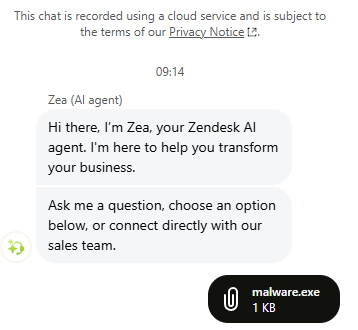
While performing a security assessment for one of our clients, Shinobi AI flagged an issue with how Zendesk handles file attachments uploaded through its chat widget. By default, these files are accessible to anyone with the URL, without authentication. Receipts, identity documents, images, screenshots: anything a customer uploads during a support conversation can be retrieved by an unauthenticated user who has the link.
To be clear, this is not a vulnerability in Zendesk's code. Zendesk provides settings to restrict attachment access, and their documentation covers how to enable them. The issue is that the secure option is off by default, and in our experience, many organisations are simply unaware of this. We helped our client lock it down quickly, and we're sharing this publicly because we suspect a lot of other organisations are in the same position.
How It Works
When a customer uploads a file through a Zendesk-powered chat widget, the attachment is stored at a permanent URL:
https://{tenant}.zendesk.com/sc/attachments/v2/{attachment_id}/{filename}
Zendesk does provide an authenticated API endpoint (/attachments/contentUrl) designed to generate time-limited signed URLs for authorised users. The permanent attachment URL itself, however, requires no authentication.
When an unauthenticated request hits the permanent URL, Zendesk responds with an HTTP 302 redirect containing a valid signed download URL in the Location header. That signed URL grants immediate access to the file. No session, no credentials required.
GET /sc/attachments/v2/{attachment_id}/{filename} HTTP/2
Host: {tenant}.zendesk.com

HTTP/2 302
location: https://p13.zdusercontent.com/api/v2/attachment_content/{attachment_id}?token=eyJhbG...
Following the redirect downloads the file.
Why This Matters
The attachment IDs use ULIDs, high-entropy identifiers that resist simple enumeration. Zendesk's position is that this constitutes a capability URL model, where knowledge of the URL itself grants access.
In theory, this is a valid pattern. In practice, URLs leak through all sorts of channels:
- Proxy and web server logs capture full request URLs
- Referrer headers leak URLs when links are clicked in browser contexts
- Browser history stores every visited URL locally
- Shared Slack channels, emails, and ticketing systems pass URLs around as plain text
- Corporate monitoring tools and DLP solutions log outbound requests
Once a URL leaks through any of these channels, the attachment is accessible to anyone, indefinitely. The signed tokens generated by the redirect have a validity window of roughly one hour, but the permanent URL never expires. A leaked permanent URL can generate fresh signed tokens at any time.
Because access is unauthenticated, there is also no audit trail linking downloads to specific users. The backend can only record that a URL was accessed, not by whom.
Abuse as Anonymous File Hosting
Beyond the data exposure risk, there's a second concern we flagged for our client. The chat widget is publicly accessible and requires no authentication to upload files. With the default configuration, this effectively turns any affected Zendesk tenant into a free, anonymous file hosting service.
Any visitor to a website running the Zendesk chat widget can:
- Open the chat widget
- Attach and upload any file via the paperclip icon
- Grab the permanent attachment URL from the network request
- Share that URL with anyone, and it works without authentication, indefinitely
The uploaded file is now hosted on {tenant}.zendesk.com. This is the part that concerned us most. Zendesk subdomains inherit the trust reputation of both the Zendesk platform and the tenant organisation itself. Security tools, email gateways, corporate proxies, and browser safe-browsing lists all treat zendesk.com subdomains as legitimate business infrastructure. Most organisations explicitly allowlist Zendesk domains because their own teams use the platform daily.
A malicious file hosted on random-upload-site.xyz gets flagged. The same file hosted on wellknown-bank.zendesk.com can sail through. An attacker exploiting this isn't just getting free hosting; they're borrowing the brand reputation of every organisation running a misconfigured Zendesk tenant.
This domain trust inheritance opens the door to several concerning scenarios:
- Malware distribution: hosting payloads on a legitimate business subdomain bypasses URL reputation checks, corporate web filters, and email link scanners. Security teams rarely block their own Zendesk subdomain. An employee receiving a link to
their-own-company.zendesk.comhas no reason to be suspicious. - Phishing campaigns: hosting credential harvesting pages or lure documents on the target organisation's own Zendesk subdomain is particularly effective. The victim sees a URL containing the name of a company they already trust, hosted on a platform they already recognise. That is a level of false legitimacy that attackers normally have to work much harder to achieve.
- C2 staging: using the upload mechanism to stage payloads or exfiltrate data through a domain that security monitoring is unlikely to flag as suspicious.
- Supply chain trust abuse: if a software vendor's Zendesk tenant is abused, links originating from
vendor-name.zendesk.comcarry implicit trust with that vendor's entire customer base. A single misconfigured tenant can extend the blast radius well beyond the organisation itself.
The organisation whose tenant is being abused takes the hit. Their brand appears in the malicious URLs. Their infrastructure serves the content. If the file is malware, it's their domain that ends up on blocklists. If it's a phishing page, it's their name the victim sees in the URL bar. And because the upload requires no authentication, there is no record of who put the file there.
When a company's domain shows up in a threat intelligence feed or a customer's incident report, the damage to brand trust is real, regardless of whether the company was at fault.
The Real-World Risk
Think about what customers upload during support conversations:
- Personally identifiable information: names, addresses, order confirmations, receipts
- Financial documents: invoices, payment screenshots, account details
- Sensitive images: health-related photographs, identity documents
- Internal screenshots: potentially exposing internal systems, configurations, or data
For organisations operating under GDPR, HIPAA, or similar regulatory frameworks, this default configuration creates serious compliance exposure on multiple fronts.
GDPR Implications
We raised the GDPR angle with our client because it goes deeper than a standard data breach notification. We'd encourage any organisation affected by this to have a similar conversation with their legal and compliance teams.
The Data Exposure Problem
Under GDPR, any organisation collecting personal data through its Zendesk chat widget is a data controller for that data. They have obligations under Article 5(1)(f) to ensure "appropriate security of the personal data, including protection against unauthorised or unlawful processing." A default configuration that makes customer attachments publicly accessible without authentication is difficult to reconcile with that obligation, regardless of whether the organisation knew the default was insecure.
If a customer uploads a photo of a skin condition, a copy of their passport, or a screenshot containing personal details, and that file is accessible to anyone with the URL, that is a failure to implement appropriate technical measures under Article 32. The fact that Zendesk provides a toggle to fix it does not absolve the controller. GDPR places the responsibility for selecting and configuring processors on the controller.
The File Hosting Problem
The anonymous file hosting angle introduces a more complex GDPR question. When a third party uploads a file containing personal data through an organisation's chat widget, and that file is stored on the organisation's Zendesk tenant and served from their subdomain, could the organisation be considered a data processor for that data?
Under GDPR, a data processor is any entity that processes personal data on behalf of a controller. The organisation didn't ask for the file. They didn't consent to storing it. But their infrastructure is hosting it, their subdomain is serving it, and Zendesk is retaining it under their tenant's storage. If someone uploads a file containing stolen personal data (a dumped database, harvested credentials, scraped PII), the tenant organisation is arguably processing that data by virtue of storing and serving it, even involuntarily.
This raises several scenarios worth considering:
- Data Subject Access Requests (DSARs): if a data subject discovers their personal data is hosted on
company.zendesk.com, they may submit a DSAR to that company. The company may have no idea the file exists, no mechanism to search for it, and no process to respond, but the obligation still applies. - Right to Erasure: under Article 17, a data subject could request deletion of their personal data from the tenant. The organisation would need to locate and remove files they didn't upload and may not know about.
- Breach Notification: if the hosted data constitutes a personal data breach (Article 33), the organisation may have notification obligations to the ICO or relevant supervisory authority within 72 hours. Discovering that your Zendesk tenant has been used to host third-party personal data weeks or months after the fact makes timely notification impossible.
- Cross-border Transfer: if the uploaded data contains personal data of EU residents and the Zendesk tenant's data is stored or served from outside the EEA, there are potential Chapter V transfer implications that the organisation never anticipated or safeguarded against.
Processor Due Diligence
Article 28 requires data controllers to "use only processors providing sufficient guarantees to implement appropriate technical and organisational measures." Organisations using Zendesk are expected to have assessed whether Zendesk's default configuration meets their security requirements. A configuration that defaults to public, unauthenticated access to customer files raises the question of whether that due diligence was performed.
In our experience, most organisations adopt Zendesk for its support capabilities and don't audit every default setting for security implications. That's understandable, but it doesn't change the controller's accountability under the regulation.
Practical Exposure
The fines under GDPR can reach up to 4% of global annual turnover or 20 million EUR, whichever is higher. More practically, a supervisory authority investigating this kind of misconfiguration would likely focus on:
- Whether the organisation conducted a Data Protection Impact Assessment (DPIA) covering their use of Zendesk
- Whether the organisation reviewed Zendesk's default security configuration before deployment
- How long the insecure default was in place before being discovered
- Whether any personal data was actually accessed by unauthorised parties
Even without evidence of actual data access, the lack of appropriate technical measures is itself a violation. The GDPR does not require proof of harm for enforcement action.
The Fix
Zendesk provides the controls to address this. To their credit, the documentation is straightforward and the settings are not difficult to enable. The relevant guides are:
- Turning on private attachments in messaging
- Allowing secure chat attachments in the Zendesk Agent Workspace
What You Should Do
If your organisation uses Zendesk messaging or chat, we'd recommend the following:
Check your attachment privacy settings. Navigate to your Zendesk Admin Centre and verify whether private attachments are enabled for both messaging and the Agent Workspace.
Enable private attachments. Follow Zendesk's documentation linked above to turn on authenticated access for chat attachments.
Audit existing attachments. Any files uploaded before enabling private attachments may still be accessible via their permanent URLs. Assess whether sensitive data may have been exposed.
Review your data handling procedures. Consider whether your support workflows involve customers uploading sensitive files, and whether your current Zendesk configuration adequately protects that data.
Talk to your security and compliance teams. If your organisation handles regulated data (PII, health information, financial records), make sure your Zendesk configuration aligns with your compliance obligations.
Closing Thoughts
We're sharing this because it's the kind of issue that affects a huge number of organisations without them knowing. Zendesk is widely used, the default is insecure, and the fix takes minutes. If this post saves someone from a data exposure incident or a difficult conversation with a regulator, it's done its job.
If you use Zendesk, check your settings today.
This issue was discovered by Shinobi Security's Agentic AI Application Tester during a client engagement and responsibly disclosed through Zendesk's bug bounty programme on Bugcrowd. Book a demo to see how Shinobi can uncover misconfigurations in your environment.
Table of Contents